


FamilyWall: Family Organizer
4.83.62K Reviews
App Specs
- Version
- 12.2.3
- Updated On
- License
- Free
- Downloads
- 5,000,000+
- Developer
- family & Co
- Categories
- Lifestyle
- Platform
- Android, iOS
Screenshots
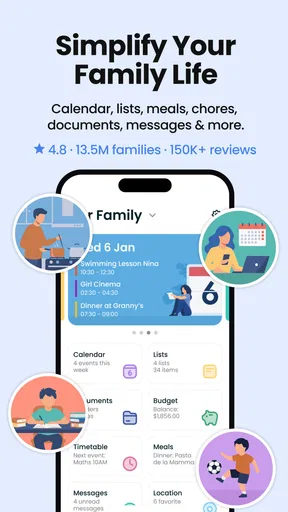
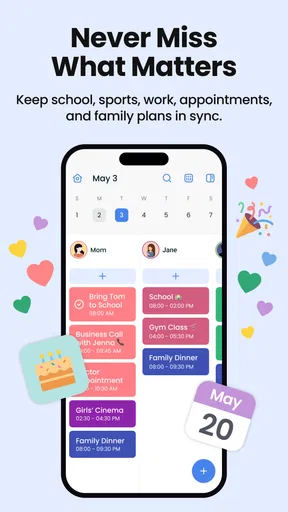
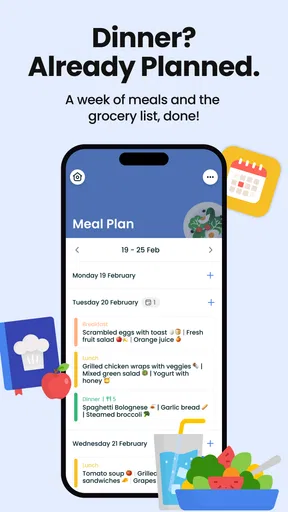
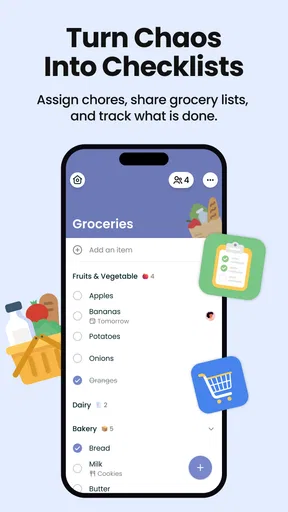
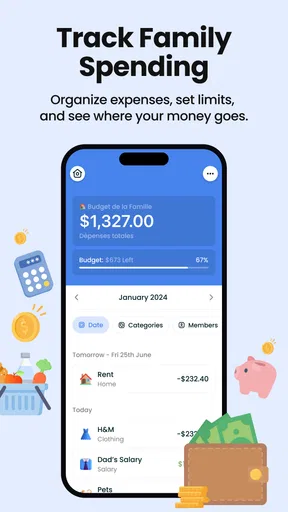

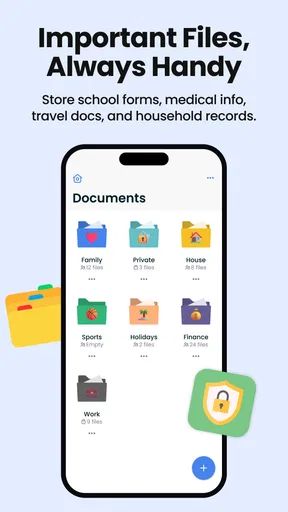
 Analysis by AppCompare
I judge a shared family organizer less by how many tools it can put on one screen and more by whether people will actually use it when they are busy. FamilyWall: Family Organizer is aimed at households trying to coordinate calendars, errands, and responsibilities in one place. That combination can save small bits of time every day, but it works best when the whole family agrees to keep the shared information current.
What to expect from day-to-day speed
The appeal here is not a complicated planning system; it is having common household information close at hand. A calendar, a shopping list, and tasks address the recurring questions that otherwise end up scattered across messages, paper notes, and individual reminders. For a family that checks those items throughout the day, bringing them together can make routine decisions feel less fragmented.
I would still treat it as a shared reference, not a guarantee that nobody will forget an appointment. A calendar only helps when someone adds the event and the right people look at it. My practical advice is to agree on a simple habit: put a new commitment in the shared calendar when it is made, rather than expecting someone else to remember it later. That small bit of household discipline matters more than filling every screen with plans.
Where a busy household puts it to work
Consider a weekday when one parent is at work, another is collecting a child, and someone else is shopping. The calendar can show the family commitment, while a shared list gives the shopper a place to check what is needed. A task can make a recurring household responsibility visible rather than leaving it as an unspoken expectation. The useful part is the handoff: each person can see the same plan instead of relying on a chain of “did you remember?” messages.
For this to stay useful, I would keep lists and tasks specific. “Buy milk” is easier to act on than a vague note like “get groceries,” and a chore with a clear owner is less likely to become everyone’s assumed responsibility. This is a small workflow choice, but it prevents a shared organizer from turning into another crowded inbox.
Meal planning can also help connect the calendar and shopping routine. If your family plans meals ahead, use that plan to decide what belongs on the shopping list before the store trip. It is a practical way to reduce last-minute guesswork, particularly when different people handle planning and shopping. If your household prefers to decide meals spontaneously, though, a dedicated meal-planning routine may feel like extra work rather than a benefit.
Shared planning versus familiar alternatives
Compared with a basic calendar app, FamilyWall is more household-focused because it brings several kinds of family coordination together. A standalone calendar may be a better fit if appointments are your only concern, especially if everyone already uses the same calendar service. A group chat is more natural for conversation, but important dates and shopping items can disappear among casual messages. A notes app can hold a list, yet it may not provide the same shared context for who needs to do what and when.
Worth Reading Before You Choose

Flipboard Shows What News Apps Must Do Beyond the Feed

Switching to Android Auto Means Rethinking Your Driving Routine

Google Calendar Makes a Crowded Week Easier to Manage

Ludo King Makes the Most of the Minutes Between Plans

Baby Panda World Brings Quick Play to Modern Phones, but Its Game Library Feels Busy

ESPN’s Live Game View Makes Following Close Games Easier
The trade-off is that an all-in-one organizer asks everyone to adopt one shared routine. If some family members will not check it, you may still need your existing calendar or a direct message for time-sensitive plans. I would introduce it gradually: start with the calendar or shopping list that causes the most friction at home, then add another shared tool only once people are using the first one. That makes it easier to tell whether the app is genuinely helping.
Who will appreciate it—and who may not
I can see FamilyWall suiting families with overlapping schedules, shared errands, and responsibilities that need to be visible to more than one person. It can also make sense for people coordinating with relatives across different households, provided each group is comfortable using a shared space. The developer is family & Co, and the app sits in the lifestyle category; its focus is everyday coordination rather than replacing every specialist tool a household might use.
It is less compelling if you live alone, already have a family calendar everyone reliably checks, or want a highly detailed project-management system. It may also be a poor match if household members do not want to share planning information or prefer keeping their own lists private. Before moving everything into it, decide which information is genuinely useful to share and which is better left in personal apps.
FamilyWall is free to install, with optional in-app purchases ranging from $1.99 to $44.99 per item. The age rating is Everyone. The app has an average rating of 4.8 from around 80 thousand ratings, alongside roughly 3.4 thousand written reviews, and has been installed over 5 million times. Those figures suggest broad interest, but they do not tell you whether its shared workflow will suit your particular family. I would begin with the free experience and consider a purchase only if you have a clear need for what it adds.
Getting Started with FamilyWall
Downloading FamilyWall was a breeze. It's available on both Android and iOS, so no matter your device, you're covered. Once installed, setting up was as simple as pie. I created a family group, invited the whole clan, and voilà, we were ready to rock and roll. The app interface is clean and user-friendly, which is a huge plus when you're trying to get everyone onboard quickly.
Features That Make Life Easier
One of the first features that caught my eye was the shared calendar. I mean, who doesn't love a good calendar? But this one’s special. You can color-code events by family member, set reminders, and even sync it with your Google Calendar. No more missing that parent-teacher meeting or soccer practice!
Then there's the shopping list feature. Picture this: you're at the grocery store, and you realize you forgot to jot down that all-important item. No worries! FamilyWall lets you update the list in real-time. So, if someone back home remembers something you missed, they can add it, and it pops up instantly on your phone. Genius, right?
Chores and tasks are another biggie. With FamilyWall, assigning chores is as easy as tapping a button. Kids can't argue they "forgot" to take out the trash when it's staring them right in the face on their phones.
Keeping Everyone Connected
Communication is key in any family, and FamilyWall gets that. The app has a built-in chat feature that allows for quick messages and updates. It's like having a private family chat room where everyone can chime in. And for those moments when words just aren't enough, you can share photos and videos directly through the app.
Safety is also a top priority. FamilyWall's location feature lets you keep track of where everyone is. It’s perfect for peace of mind, especially if you have teenagers who are always on the move. Plus, you can set up safe zones and get notifications when someone arrives or leaves a designated area.
Customization and Personalization
One thing I love is how customizable the app is. You can personalize the dashboard to fit your family's unique needs. Whether it's adding a widget for quick access to the grocery list or setting up a reminder for family movie night, it’s all about what works best for you.
Let’s not forget the ability to create multiple family groups. Perfect for those of us with extended families or even for organizing events with friends. Each group operates independently, so there's no overlap or confusion.
Practical limits, devices, and reliability
My main caution is that a shared organizer is only as reliable as the routine around it. If one person adds appointments but the rest of the family keeps checking separate calendars, details can still be missed. I would choose one place as the household source of truth, then use direct messages for urgent changes that someone needs to notice right away. That is less about a technical flaw and more about setting expectations before depending on the app.
For heavier use, such as maintaining several lists, schedules, and family groups, a little organization helps. Keep group names and lists easy to distinguish, and avoid putting unrelated errands into one long list. If something appears out of date, check that everyone is looking at the intended group and that the person responsible has added the change. I would not assume that a planning tool can replace a quick confirmation for a last-minute pickup or a time-sensitive change.
On device fit, the current version is 12.0 and the minimum operating system is Android 5.0. That gives older Android devices a stated starting point, but actual responsiveness can still vary with the phone, its available resources, and the quality of its connection. I would not promise identical speed on every device. If an older phone feels sluggish, keeping the app focused on the shared items you use most—and avoiding unnecessary background activity from other apps—can make everyday use more comfortable.
FamilyWall was released on December 2, 2011, and its continued presence across Android and iOS makes it a familiar option for households that want a single shared place to coordinate. Still, I would test the routine with a small set of real plans before asking everyone to depend on it. Add an upcoming event, make a short shopping list, and see whether each family member can find and use those items without prompting. That trial tells you more about household fit than a long setup session does.
Final Thoughts
After spending some quality time with FamilyWall, I can confidently say it's a game-changer for family organization. It manages to combine functionality with ease of use, making it a must-have for any busy family. The features are thoughtfully designed to keep everyone in the loop and simplify day-to-day life.
So, if you're tired of the chaos and looking for a way to streamline your family’s organization, give FamilyWall a try. It's like having a personal family assistant right in your pocket. And really, who wouldn’t want that?
My performance verdict
For me, the strongest reason to try FamilyWall is not a promise of extraordinary speed; it is the convenience of putting shared household decisions where several people can find them. The app’s mix of calendar, lists, tasks, and family communication makes sense when coordination is the daily problem. Its practical limit is equally clear: it cannot make an unengaged family member check a plan, or turn a vague task into a clear agreement.
I would recommend starting with one recurring pain point, such as forgotten groceries or conflicting appointments, and seeing whether the family naturally returns to the shared space. If it does, expand the routine at a comfortable pace. If everyone already has a reliable system, or if a simple calendar does the job with less effort, staying with that option is reasonable. The best organizer is the one your household actually keeps up to date, and FamilyWall is worth considering when a shared, family-centered workspace would make that easier.
Pros
- User-friendly interface for all ages.
- Syncs seamlessly across multiple devices.
- Customizable notifications and alerts.
- Includes a shared grocery list feature.
- Allows private family messaging.
Cons
- Limited free version features.
- No offline access to calendar.
- Occasional sync delays reported.
- Premium version can be pricey.
- No integration with some calendars.
FAQs for FamilyWall: Family Organizer
What features does FamilyWall: Family Organizer offer to help manage family activities?
FamilyWall provides a wide array of features to streamline family management. It includes a shared calendar to keep track of appointments and events, a shopping list for groceries, a meal planner, and a secure messaging platform. The app also offers a family locator to track members’ locations, ensuring everyone stays connected and coordinated.
Is FamilyWall: Family Organizer secure for sharing sensitive family information?
Yes, FamilyWall prioritizes user security and privacy. The app uses encryption to protect shared information and ensures that only invited family members have access to the shared content. Additionally, you can control who sees specific events, lists, or messages, making it a safe environment for family communication.
Can FamilyWall: Family Organizer be used across different devices and platforms?
Absolutely. FamilyWall is available on both Android and iOS devices, allowing seamless cross-platform use. You can access your family’s shared information from smartphones and tablets, ensuring everyone stays updated, regardless of their preferred device. This flexibility enhances the app's usability for all family members.
Does FamilyWall: Family Organizer offer any integration with other apps or services?
FamilyWall can integrate with Google Calendar, allowing you to sync external events with the app for a more comprehensive scheduling experience. This integration helps ensure you don’t miss important events by consolidating calendars, making it easier to manage both personal and family schedules in one place.
Is there a cost associated with using FamilyWall: Family Organizer?
FamilyWall offers both free and premium versions. The free version includes basic features, while the premium version provides advanced functionalities such as additional storage, premium support, and enhanced location tracking. Users can choose the version that best fits their needs, with the option to upgrade at any time.


